
Technology
KaliScan: Open Source Security Tool for Fast Domain Enumeration


KaliScan is an open-source security tool built for fast domain enumeration and basic web reconnaissance. It combines several popular security utilities into one simple workflow. The tool uses Docker to create a small Kali Linux environment where users can review authorized domains without installing every program separately.
KaliScan is not a person, but a software project. This article explains its background, creator information, design, tools, setup process, uses, limits, and legal responsibilities. It also looks at how KaliScan works and why responsible use is important.
What Is the KaliScan Security Tool?
KaliScan is a Docker-based reconnaissance utility available through GitHub. Its main goal is to automate the early stages of discovering internet-facing domain assets. The tool helps security researchers collect basic information about a target domain from different sources.
The project accepts one domain name and runs a Bash script called quickscan.sh. This script connects several security utilities and saves results as text files, CSV reports, and screenshots.
KaliScan checks different parts of a domain’s public presence, including:
- WHOIS information
- Subdomain discovery
- DNS records
- Web responses
- SSL settings
- Open ports
- Security headers
- Website screenshots
These results help users understand what information is visible from outside a network. However, KaliScan is not a complete vulnerability management platform. It focuses on discovery and basic checks rather than full security testing.
Users still need to review results manually. Some findings may need further investigation because automated tools can miss issues or create false positives.
The project is released under the GPL 3.0 license. It mainly uses Shell scripting, allowing users to inspect, modify, and reuse the code under the license rules.
Who Created KaliScan?
The public KaliScan repository is available through the GitHub account nixintel. This account published the project files, including the README document, Dockerfile, license information, and scanning script.
The repository also credits another contributor. The project notes that Salaheldinaz completed the original idea and early work behind the script.
Based on available information, nixintel is best described as the repository publisher and project owner. Salaheldinaz is credited for the initial concept and development work.
The repository does not provide detailed personal information about either contributor. There is no confirmed public information about their private background, employer, or personal history.
For small open source projects, this type of limited background information is common. The available code, documentation, and contributor credits provide the most reliable details about the project.
How KaliScan Works?
KaliScan starts when a user provides an authorized domain to the quickscan.sh script. The script then follows a set process to collect information about the target.
The first steps gather WHOIS records and search for subdomains using Sublist3r. After finding possible subdomains, the script creates HTTPS addresses and checks DNS A records with dig.
The workflow then uses curl to collect website response details. This includes HTTP status codes, redirects, and remote addresses linked to discovered domains.
After collecting IP information, KaliScan runs additional security utilities. These tools check different parts of the target environment:
- SSLyze reviews SSL and TLS settings.
- Unicornscan checks TCP and UDP ports.
- Nmap reviews HTTP security headers.
- EyeWitness captures website screenshots.
All collected results are saved inside the output folder. Docker connects this folder with the user’s computer through a mounted volume, making reports easy to access after the scan finishes.
This workflow reduces the need to open many separate tools manually. It gives users a repeatable process for collecting basic reconnaissance data during approved security assessments.
KaliScan and Its Dockerized Kali Linux Environment
KaliScan uses the official Kali rolling container image as its base. The Docker setup installs only the tools needed for the scanning workflow instead of creating a complete Kali Linux desktop system.
This design makes the project portable. Users can run the same environment on different machines as long as Docker is available.
The Dockerfile prepares important parts of the environment, including:
- An output folder for reports
- A screenshot directory
- The quickscan.sh script
- Required permissions
- Bash as the main container command
Docker helps keep the setup consistent. Each new container starts with the same installed tools and configuration.
It also makes cleanup easier after testing. Users can remove the container without manually uninstalling every security package from their computer.
However, Docker does not remove all risks. Users should review container permissions, update dependencies, and understand which folders are shared with the host system.
Main Features of KaliScan
One of the main KaliScan features is automated subdomain discovery. Finding subdomains can reveal different web services, development systems, and other approved assets connected to a domain.
The tool also collects DNS and web response details. HTTP status codes and redirects can help users understand which discovered systems are active.
KaliScan includes basic security checks through SSL testing, port discovery, and HTTP header reviews. These checks provide an early view of possible configuration problems.
Another useful feature is its reporting system. The tool stores different outputs, including:
- WHOIS results
- Domain lists
- DNS information
- Port scan records
- SSL reports
- Security header details
- Website screenshots
The Bash script can also be changed by experienced users. They can add new tools from Kali repositories or adjust the workflow for specific authorized security projects.
KaliScan’s main advantage is not creating new scanning technology. Its value comes from combining existing tools into one organized process.
Security Tools Included in KaliScan
KaliScan combines several well-known security utilities. Each tool handles a different part of the reconnaissance process.
Sublist3r helps discover subdomains linked to a domain. dig collects DNS information, while WHOIS provides publicly available registration details.
curl checks website responses, redirects, and server information. SSLyze examines SSL and TLS settings to identify possible configuration concerns.
Unicornscan searches collected IP addresses for open TCP and UDP ports. Nmap checks HTTP security headers on common web ports.
EyeWitness creates screenshots of discovered HTTPS pages. These screenshots help researchers quickly review visible web services.
The Docker environment also installs support packages such as:
- wget
- git
- nano
- dnsutils
- libpcap development files
No single tool completes a full security assessment. KaliScan works by combining the output of multiple focused tools into one automated report.
KaliScan System Requirements and Installation
KaliScan requires a computer that can run Docker Engine or a compatible Docker setup. Users also need terminal access and Git to download the project files from GitHub.
The installation process begins by downloading the repository:
git clone https://github.com/nixintel/KaliScanAfter downloading the files, users enter the project folder and build the Docker image.
The documented build command is:
docker build -t kaliscan .Docker reads the included Dockerfile and installs the required tools inside the local image. This creates a ready environment for running the KaliScan workflow.
Before running scans, users should create a local folder for saving reports. This folder connects with the container output directory, allowing users to view scan files after the process ends.
Software packages and dependencies can change over time. Users should review the Dockerfile, check installation messages, and test the setup in a controlled environment before using it for approved security work.
How to Run Domain and Vulnerability Scans With KaliScan?
KaliScan runs through Docker commands that connect a local output folder with the container. Users then provide an authorized domain for testing.
A common command format is:
docker run -it -v /local/folder:/home/outputs kaliscan ./quickscan.sh example.comUsers replace the local folder path with their preferred report location and replace the example domain with an approved target.
The -it option opens an interactive terminal session. The -v option connects the computer’s folder with the container’s output directory.
Users can also run the container in the background by adding the -d option. Another option is starting the container without running the script, which allows direct access to the Bash environment.
Although KaliScan is sometimes described with security scanning terms, it mainly focuses on reconnaissance and basic checks. It does not confirm that a system is secure or discover every possible vulnerability.
Security teams should use additional testing methods and manual review before making decisions based on KaliScan results.
Common Uses, Benefits, and Limitations of KaliScan
KaliScan can support different types of authorized security activities. Common uses include penetration testing preparation, security learning, asset discovery, development reviews, and approved bug bounty research.
Its main benefit is convenience. Instead of opening several tools separately, users can run one script that collects information from different security utilities.
The Docker design also reduces direct installation on the host computer. Users can update the container, modify the script, and add new tools when needed.
KaliScan can help users collect information such as:
- Public domain records
- Subdomains
- DNS details
- Website responses
- SSL information
- Open ports
- Website screenshots
However, the tool has limits. It may create incomplete results, miss certain issues, or show findings that need further checking.
The project does not include features found in larger security platforms, such as:
- Dashboards
- Risk scoring
- Automated scheduling
- Team reporting
- Remediation tracking
Users should treat KaliScan as an early discovery tool. Human review is still needed to understand results correctly.
Is KaliScan Safe and Legal to Use?
KaliScan can be used safely when users understand the tool, review its code, and scan only approved systems.
The script sends different types of requests, including DNS queries, web requests, SSL checks, and port scans. These activities may trigger security alerts or affect poorly configured systems.
Legal use depends on permission. Users should only scan:
- Systems they own
- Personal testing environments
- Authorized company assets
- Targets covered by written permission
A website being available online does not mean anyone can test it. Public access is different from legal authorization.
Bug bounty researchers should follow each program’s rules. They must respect allowed targets, testing methods, rate limits, and reporting requirements.
Users should also protect collected information. Scan reports may contain technical details about systems, so they should be stored carefully and shared only with approved people.
KaliScan Alternatives
Several other security tools can perform similar tasks. The best option depends on the user’s goal and the depth of testing required.
Nmap is a popular choice for network discovery. It provides detailed control over host discovery, ports, services, and script-based checks.
OWASP Amass focuses on attack surface discovery and subdomain mapping. It is useful for researchers who need deeper external asset discovery.
Nuclei uses templates to check supported security issues. It helps researchers test known patterns across approved targets.
Greenbone provides a broader vulnerability management approach. It includes organized scanning and risk review features for larger security programs.
Other options include:
- Recon-ng for reconnaissance workflows
- Nikto for web server checks
- EyeWitness for website screenshots
KaliScan is useful because it combines several tools into one simple process. However, specialized tools may provide more depth, updates, or advanced reporting features.
Users should compare documentation, maintenance activity, supported targets, and output options before choosing a security tool.
Final Thoughts
KaliScan is an open-source security project that combines common reconnaissance tools inside a lightweight Docker environment. Its Bash workflow helps users collect domain information in a repeatable way.
The tool can gather details about subdomains, DNS records, web responses, SSL settings, ports, security headers, and visible website pages.
KaliScan does not create its own scanning technology. Its value comes from connecting several existing security tools into one organized workflow.
Users should inspect the code, update dependencies, review findings, and follow legal rules before running scans.
KaliScan works best as a starting point for security research. It should support careful testing and manual analysis rather than replace complete security assessments.
FAQs
What Is KaliScan Used For?
KaliScan is used for authorized domain reconnaissance. It discovers subdomains, checks DNS information, reviews web responses, examines SSL settings, checks ports, and creates screenshots of websites.
Who Developed the KaliScan Security Tool?
The public KaliScan repository is published under the nixintel GitHub account. The project credits Salaheldinaz for the original idea and early script development.
Does KaliScan Need a Full Kali Linux Installation?
No. KaliScan uses Docker to create a Kali Linux-based environment. Users only need Docker and the required setup files instead of installing a full Kali Linux desktop.
Is KaliScan a Complete Vulnerability Scanner?
No. KaliScan mainly performs enumeration and basic security checks. It does not find every vulnerability and should be combined with manual testing and other security methods.
Can KaliScan Scan Any Public Website?
No. Users should only scan websites and systems they own or have permission to test. A public website does not automatically mean it is an approved security target.
Next: Nemin.io: The Free Business and Marketing Calculator Platform
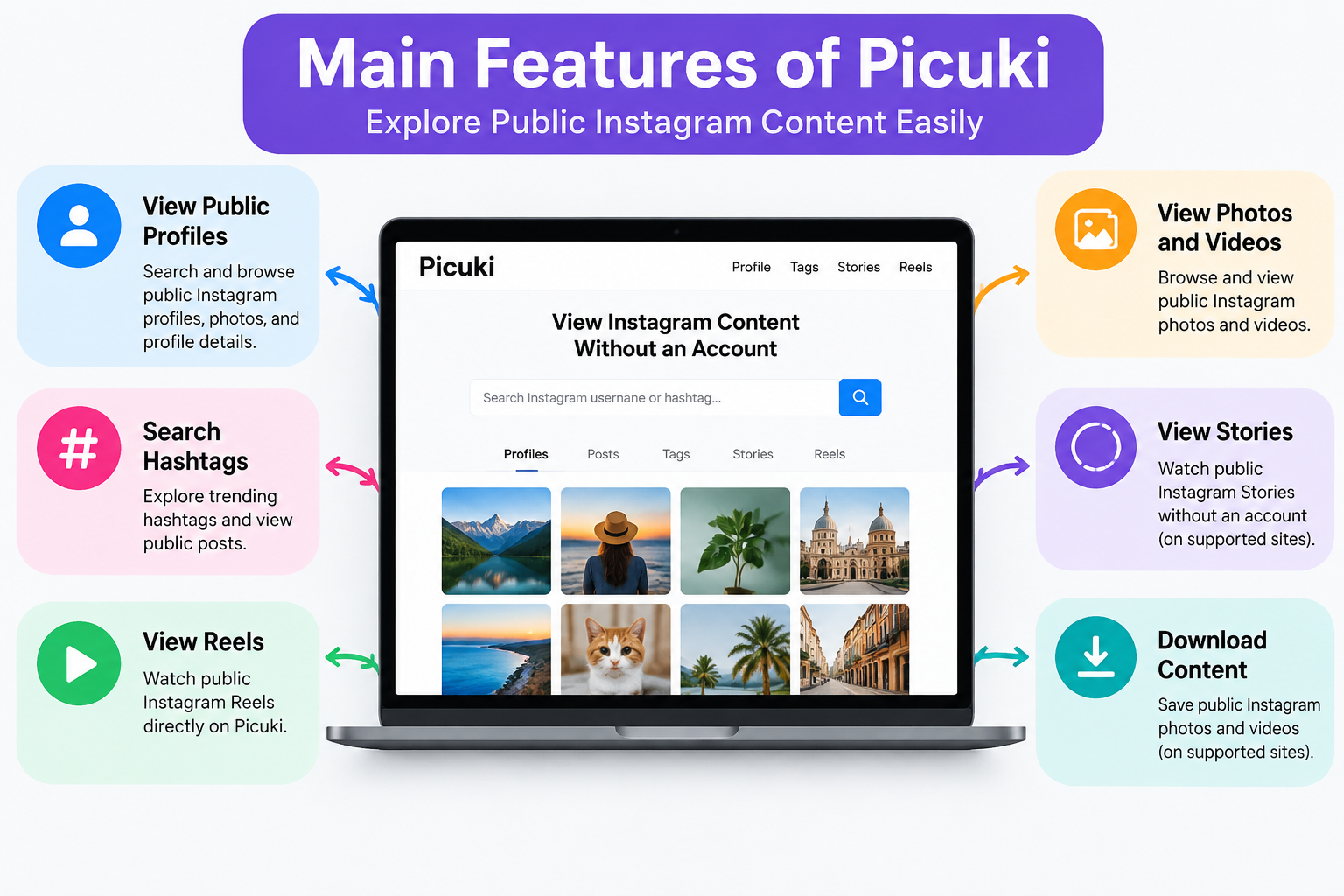
Picuki was a third-party Instagram viewer that became popular for browsing public Instagram content without logging into an account. It allowed users to view profiles, posts, hashtags, and some other public Instagram content through a web browser.
Picuki was not made by Instagram or Meta. It worked as a separate service that collected and displayed public Instagram information.
Today, many websites use the Picuki name. Some may not be connected to the original service. Users should check each website carefully before using it.
How Did Picuki Work?
Picuki worked by showing public Instagram content through its own website. Users could search for an Instagram username, hashtag, or profile and view available information.
Users could usually access:
- Public Instagram profiles
- Photos and videos
- Captions
- Hashtags
- Public Reels
- Some Stories and Highlights
- Hashtag searches
Picuki did not work like the Instagram app. Users could not:
- Send messages
- Like posts
- Follow accounts
- Upload content
Main Features of Picuki
Anonymous Instagram Viewing
One of the main reasons people used Picuki was to view public Instagram profiles without logging into Instagram.
Users could search for accounts and browse public posts without using their own Instagram profile.
However, anonymous viewing does not mean complete privacy. Websites may still collect technical data, such as browser details or device information.
View Public Instagram Profiles
Picuki allowed users to search public Instagram accounts and view basic profile details.
This included:
- Username
- Profile picture
- Bio information
- Public posts
- Captions
- Hashtags
- Some engagement details
Picuki could not normally show private Instagram accounts.
Instagram Story Viewing
Some Picuki versions offered Instagram Story viewing without showing the viewer’s account.
This feature depended on how the website accessed public Instagram data. It may not always work.
Users could only view Stories from public accounts.
Download Instagram Photos and Videos
Some Picuki websites included options to save public Instagram photos and videos.
Users should remember that Instagram content belongs to the original creators. Saving or sharing someone’s content without permission may create copyright issues.
Can Picuki View Private Instagram Accounts?
No, Picuki cannot legally access private Instagram accounts.
Private profiles can only be viewed after the account owner accepts a follow request.
Any website claiming it can unlock private Instagram accounts is not reliable and may put users at risk.
Is Picuki Safe?
Picuki was often used because it did not usually ask users for their Instagram password. This made it different from many unsafe Instagram viewer websites.
However, safety depends on the exact website being used. Many websites now use the Picuki name.
Users should avoid:
- Entering Instagram passwords
- Installing unknown apps
- Clicking suspicious ads
- Sharing personal information
A safe Instagram viewer should not ask for private account details.
Is Picuki Legal?
Using Picuki to view public Instagram content is different from accessing someone’s private account. Picuki did not provide access to private profiles or protected information.
Users should follow basic rules when using Instagram content:
- Respect Instagram policies
- Do not misuse other people’s photos or videos
- Give credit when required
- Avoid sharing content without permission
Viewing public posts and using someone’s content are two different actions.
Why Did People Use Picuki?
Many people used Picuki because it offered a simple way to browse Instagram content.
Common reasons included:
- Viewing Instagram profiles without an account
- Checking public posts quickly
- Searching hashtags
- Finding content ideas
- Viewing public photos and videos
- Browsing Instagram without opening the official app
It was mainly used by people who wanted quick access to public Instagram information.
Is Picuki Still Working?
The current status of Picuki is unclear because many websites now use the same name. The original service changed over time, and some users report that it is no longer available in the same form.
Some Picuki websites may be different services using the same brand name.
Before using any Picuki website, users should check:
- Website safety
- Privacy practices
- Whether it asks for login details
- Whether it contains suspicious downloads
Picuki Alternatives
People looking for Instagram viewing options can use other methods and tools.
Some alternatives include:
- Instagram’s official website for public profiles
- Instagram search for public posts and hashtags
- Social media tools for brand research
- Instagram analytics tools for account owners
Official Instagram tools are usually the best choice for managing accounts and viewing account data.
Bottom Line
Picuki was a popular Instagram viewer that allowed users to browse public Instagram content without logging in. It became known for profile searches, public post viewing, hashtag searches, and some media viewing features.
Picuki was not an official Instagram service. It could not access private accounts or bypass Instagram privacy settings.
Today, different websites use the Picuki name. Users should be careful and avoid sharing passwords or personal details on unknown websites.
Next: Nemin.io: The Free Business and Marketing Calculator Platform

Nemin.io is a free online platform that offers business and marketing calculators for pricing, budgeting, ROI, and planning. It is designed for freelancers, agencies, startups, marketers, consultants, and small business owners who need quick estimates for common business tasks.
Unlike a person-based biography, there is limited public information about the founders or team behind Nemin.io. The platform itself focuses on providing simple tools such as website cost, SEO budget, Google Ads, profit margin, ROI, and other business calculators.
Nemin.io has built a public profile as a practical calculator website rather than a company centered around a known individual. Details about its ownership, background, and private information are not widely available from verified sources.
How Nemin.io Works
Nemin.io works through simple online calculators. Users choose a tool, add their details, and receive a result based on the information provided.
The process includes:
- Select a calculator
- Add costs, goals, or business details
- View the result
- Use the data for planning
These tools help users save time because they do not need to create formulas in spreadsheets.
Main Tools Available on Nemin.io
Nemin.io offers calculators for different business and marketing needs. These tools help users handle common planning tasks.
Some available tools include:
- Website cost calculator
- SEO budget calculator
- Google Ads spending calculator
- ROI calculator
- Profit margin calculator
- Break-even calculator
- Freelance rate calculator
- Agency retainer calculator
- Social media pricing calculator
- Email marketing ROI calculator
- Word and text counting tools
Each calculator focuses on a specific task. Users can choose a tool based on their needs.
Who Can Use Nemin.io?
Nemin.io can help different users who need quick business calculations.
It is useful for:
- Freelancers setting service prices
- Agencies creating client proposals
- Startups planning budgets
- Marketers checking campaign costs
- Consultants reviewing business numbers
- Small businesses making financial plans
The platform is mainly used for simple planning and quick calculations.
Nemin.io for Freelancers and Agencies
Freelancers and agencies often need to set prices for their services. Nemin.io provides tools that can help estimate rates, costs, and possible returns.
Freelancers can use these tools for:
- Setting hourly rates
- Checking project costs
- Planning income goals
Agencies can use them for:
- Creating service packages
- Planning marketing budgets
- Preparing client discussions
The results can support planning, but users should consider their own business needs before setting final prices.
Is Nemin.io Free?
Nemin.io provides free access to its online calculators. Users can use the tools without creating an account.
The platform allows users to open a calculator, enter information, and get results quickly.
Benefits of Using Nemin.io
Nemin.io offers simple tools for users who need fast calculations.
Main benefits include:
- Free online calculators
- Easy-to-use tools
- No need to build spreadsheets
- Quick results for planning
- Helpful business and marketing calculations
The platform is useful for getting basic numbers before making business plans.
Limitations of Nemin.io
Nemin.io can help with basic calculations, but users should know its limits. Results depend on the information entered into the tools.
The platform does not replace professional financial advice or detailed business analysis.
Some limits include:
- Results depend on user input
- Complex decisions may need more research
- Costs and prices can change
- Important decisions should be checked carefully
Nemin.io works best as a planning tool for early ideas and simple calculations.
Is Nemin.io Safe and Reliable?
Nemin.io appears to be an active website that provides business and marketing calculators. Users can access its tools online.
There is no verified information showing that Nemin.io is a scam. However, users should review results before using them for important financial decisions.
The platform provides calculations, but users must consider their own goals and business conditions.
Ownership Information About Nemin.io
Public information about the owner, founder, team, and company behind Nemin.io is limited.
There is no widely available verified information about:
- Founder details
- Company registration
- Headquarters
- Funding details
Users should check official sources for the latest company information.
Why People Use Nemin.io
People use calculator tools because they make planning easier and save time.
Nemin.io can help answer questions such as:
- What is the possible cost of a website project?
- How much budget is needed for marketing?
- What profit margin should a business review?
- How much should a freelancer charge?
The tools give users a starting point for planning.
Nemin.io vs Manual Spreadsheets
Manual spreadsheets require users to create formulas and update calculations. Nemin.io provides ready-made calculators for common business tasks.
| Nemin.io | Manual Spreadsheets |
|---|---|
| Ready-made calculators | Requires creating formulas |
| Faster for simple tasks | Needs more setup time |
| Easy for beginners | Requires spreadsheet skills |
| Good for quick estimates | Better for custom reports |
Both options can be useful depending on the user’s needs.
Final Thoughts on Nemin.io
Nemin.io is a free platform that provides business and marketing calculators. It helps users check prices, budgets, ROI, and other basic calculations.
The platform can help freelancers, agencies, marketers, and small businesses save time. Its tools are simple and easy to use.
Nemin.io should be used as a starting tool. Users should do more research before making major business or financial decisions.
Next: SEO by HighSoftware99.com: The Truth Behind 1.5M Search Volume

Homecz is described as a smart-home framework that helps connected devices work together. It is also called Home Connection Z Tech. The idea is to link lights, thermostats, locks, cameras, sensors, and home appliances through one system. This could help users control their homes without opening several apps or giving the same commands each day.
Many homes now use smart devices from different brands. One brand may make the lights, while another makes the thermostat. Cameras and door locks may use separate apps. Each device can work well alone, but using them together can be hard.
Home Connection Z Tech aims to make home control easier through shared settings and smart routines. However, public details about the framework are limited. It is not a confirmed industry standard like Matter. Its main ideas focus on device control, better links between products, and simple home automation.
What Is Homecz?
Homecz is described as a Home Connection Z Tech framework for smart homes. Its main goal is to connect different smart devices through one control system.
A smart home may have lights, motion sensors, speakers, cameras, smart plugs, and heating controls. Each product may come with its own app. Managing all these apps takes time.
A shared system could bring these controls together. It could also allow devices to respond to each other.
For example:
- A door sensor could turn on a hallway light.
- A thermostat could lower the heat when nobody is home.
- A motion sensor could switch on lights when someone enters a room.
- A security routine could lock doors when everyone leaves.
These actions depend on device support and the software used.
The idea is similar to Matter, a smart-home standard from the Connectivity Standards Alliance. Matter helps supported devices from different brands work together.
How the Home Connection Z Tech Concept Works
The main purpose of homecz is to help smart devices share information and follow common rules.
Most smart devices respond to direct commands. You tap a button to turn off a light or change the room temperature.
A connected system can do more. It can use data from several devices to start an action without waiting for a new command.
How Smart Routines Work
A system may use:
- Time and daily schedules
- Room temperature
- Motion and occupancy sensors
- Door and window status
- User settings
- Saved home routines
For example, a morning routine could open smart blinds, turn on lights, adjust the heat, and start a supported coffee machine.
At night, another routine could lock doors, lower the heat, and turn off selected lights.
These actions only work when the devices support them. A control system cannot add features that the hardware does not have.
One Hub Instead of Many Apps
A major goal of Home Connection Z Tech is to make device control easier.
Many smart-home owners use several apps. One app controls the lights. Another handles cameras. A third manages heating or security.
Switching between these apps can become a problem as more devices are added.
Homecz aims to bring these controls into one place.
What a Central Dashboard Could Show
A shared dashboard could include:
- Connected devices and their status
- Room lights and switches
- Temperature settings
- Security alerts
- Smart locks and cameras
- Saved automation routines
Users could control several devices without opening each brand’s app.
This idea is already used by some smart-home platforms. Matter also helps supported devices communicate across different brands and systems.
Home Connection Z Tech focuses on the same broad goal: making smart-home control simple and easy to manage.
Adaptive Intelligence and Daily Routines
Basic home automation uses fixed rules.
For example, a porch light may turn on at 7:00 p.m. A thermostat may lower the heat at 10:30 p.m.
These rules are useful, but daily habits can change.
An adaptive homecz system could use device data to respond to household routines. It might track when rooms are used, when people leave, or which settings are chosen most often.
This could reduce the need to make the same changes every day.
Example of Adaptive Automation
Suppose someone often arrives home between 5:30 and 6:00 p.m.
A supported system could prepare the house before they arrive. It might turn on selected lights or adjust the room temperature.
If nobody comes home, occupancy data could help keep those devices off.
This type of control can make daily tasks easier. However, users should still decide which actions the system can take.
They should also be able to:
- View saved routines
- Change automation settings
- Stop unwanted actions
- Turn off automatic learning
- Use manual controls when needed
Smart automation should help users without taking away control.
Connecting Lights, Climate, Security, and Appliances
The usefulness of homecz depends on which devices it can connect and control.
A shared system could manage several parts of a smart home.
Smart Lighting
Connected bulbs, switches, and motion sensors can work through shared routines.
For example, lights could turn on when someone enters a room. Users could also turn off all supported lights with one command.
Heating and Cooling
Smart thermostats can use temperature readings, schedules, and occupancy data.
A routine could lower heating when a room is empty or adjust cooling before someone arrives home.
Home Security
Smart locks, cameras, door sensors, and alarms can share status information when supported.
An away routine could lock doors, activate security sensors, and turn off selected devices.
Connected Appliances
Some smart appliances allow remote control or scheduled actions.
A compatible system could include these products in home routines.
However, not every connected appliance supports the same features. Device models, software, network support, and brand rules all affect what is possible.
Why Device Interoperability Matters
Smart-home devices do not all use the same network technology.
Some connect through Wi-Fi. Others use Thread, Zigbee, Bluetooth, Ethernet, or Z-Wave.
Different systems may also need separate hubs or online accounts.
This can make it hard to connect products from different brands.
Common Smart-Home Technologies
| Technology | Main Use |
|---|---|
| Wi-Fi | Connects many smart devices to home networks |
| Thread | Supports low-power smart-home devices |
| Zigbee | Connects sensors, lights, and other devices |
| Bluetooth | Supports short-range device connections |
| Ethernet | Provides wired network connections |
| Z-Wave | Connects compatible smart-home devices |
Matter supports communication over Wi-Fi, Ethernet, and Thread. Some other devices can connect through compatible bridges.
This matters because a shared control system needs a way to communicate with different products.
A hub may connect some devices directly. Software links and bridges may help connect others.
For users, the goal is simple. Devices should work together without needing separate controls for every action.
Homecz and Matter Are Not the Same Thing
It is important to understand the difference between homecz and Matter.
Matter is an established smart-home standard managed by the Connectivity Standards Alliance. It has published technical rules and certified products.
Home Connection Z Tech does not have the same level of public documentation.
There is not enough verified information to describe it as a direct rival to Matter.
Main Differences
| Feature | Homecz | Matter |
|---|---|---|
| Main idea | Shared smart-home control | Cross-brand device communication |
| Public documentation | Limited | Published specifications |
| Industry certification | Not publicly confirmed | Certified products available |
| Main focus | Central control and automation | Device compatibility |
| Industry status | Not established as a formal standard | Established industry standard |
A smart-home framework could use Matter to connect supported products. It would not need to replace the standard.
This approach could help users connect devices from several brands while keeping one main control system.
Can It Make a Home More Energy Efficient?
Smart-home automation can help reduce energy waste when it is set up correctly.
A shared system could control lighting, heating, cooling, and selected appliances through common routines.
For example:
- Lights could turn off when rooms are empty.
- Heating could drop when nobody is home.
- Smart plugs could switch off selected devices.
- Blinds could help manage heat and sunlight.
- Cooling could follow room use and saved settings.
Homecz could bring these actions into one routine instead of making users set them up separately.
How an Away Routine Could Work
When someone leaves home, a supported system could:
- Turn off selected lights.
- Change the thermostat to an energy-saving setting.
- Switch off chosen smart plugs.
- Lock compatible doors.
- Activate security sensors.
This would allow several actions to happen through one command or trigger.
However, lower energy use is not guaranteed. Savings depend on the home, weather, appliances, settings, and daily habits.
Poorly planned routines can also waste power. For example, heating an empty room or leaving lights on longer than needed may increase energy use.
Security and Privacy Need Equal Attention
Connected homes can collect a large amount of data.
Door sensors may record when people enter or leave. Thermostats can show when rooms are used. Cameras may record video, while voice assistants may process spoken commands.
This makes privacy and security important for homecz and similar systems.
Research from the National Institute of Standards and Technology (NIST) has examined smart-home privacy and security concerns. Its 2025 study looked at users of smart lights, security devices, sensors, thermostats, and voice assistants.
Different devices can create different privacy risks.
Smart-Home Security Tips
Users should look for:
- Strong account passwords
- Multi-factor login protection
- Regular software updates
- Clear app permissions
- Secure device connections
- Reliable manufacturer support
- Simple ways to remove old devices
Software updates are important because they can fix security problems.
NIST has also warned about the risks of devices that no longer receive manufacturer support. Known security flaws may remain open when updates stop.
A central hub needs strong protection because it may control several important home systems.
If one account handles locks, cameras, and alarms, keeping that account secure is especially important.
What a Good Homecz Setup Should Include
A useful homecz setup should start with devices that can work together.
Before choosing a hub or control system, users should check which products and network methods it supports.
Lighting, thermostats, locks, cameras, speakers, and sensors may all have different needs.
Start With Compatible Devices
Check the following details:
- Supported device brands
- Network requirements
- Hub or bridge requirements
- Available software updates
- Internet connection needs
- Local control support
- Security settings
Compatibility matters more than the total number of connected gadgets.
Create Simple Home Routines
Start with actions that solve common problems.
A nighttime routine could turn off downstairs lights and lock doors. An away routine could lower heating and switch on selected security features.
A morning routine might slowly brighten bedroom lights or change the temperature.
These routines should remain easy to change.
Manual controls are also important. Users should be able to turn lights on, unlock doors, or change heating without waiting for an automatic routine.
Keep Device Names Clear
Simple names make a smart-home dashboard easier to use.
For example, “Living Room Lamp” is easier to understand than a long product model number.
Grouping devices by room also helps. Users can find the controls they need without searching through a large device list.
Benefits and Limits of the Framework
The main appeal of homecz is shared device control.
A connected home can become easier to manage when devices work through one system.
Possible Benefits
- Fewer apps: Users could manage supported devices from one dashboard.
- Simple routines: Several actions could run through one command.
- Better device links: Compatible products could share useful information.
- Less manual work: Saved routines could handle repeated tasks.
- Energy control: Lights and heating could respond to room use.
- Clear home status: Users could check connected systems in one place.
These benefits depend on the features the system can support.
Main Limitations
Smart-home frameworks also face several problems.
Older products may not support new connection methods. Some brands limit access to their devices. Cloud-based features may stop working during internet outages.
Manufacturer support can also end, leaving devices without important updates.
Complex automation creates another problem.
For example, a motion sensor may tell a light to turn on while a nighttime routine tells it to stay off. Two thermostat settings may also conflict.
A good system needs clear rules for which command takes priority.
Users should always have a way to change or stop unwanted actions.
The Future of Home Connection Z Tech
The future of homecz depends on whether the concept gains clear technical details and practical support.
Smart-home brands are already working to improve links between devices. Matter supports cross-brand communication, while hubs and bridges help connect products through shared systems.
Future home automation may also use more information from sensors and daily routines.
Instead of waiting for each command, a smart home could respond to changes around the house.
How Future Smart Homes Could Work
A system could use information such as:
- Whether anyone is home
- Which rooms are being used
- Whether doors and windows are open
- Current indoor temperature
- Electricity prices, where that data is available
- Saved comfort and lighting settings
These details could help supported devices respond to everyday needs.
For example, a room could stay cool when someone is inside. Lights could turn off when the room becomes empty. Security settings could change when everyone leaves.
However, these features need accurate sensors, supported devices, and clear user controls.
The aim should be to make home tasks easier without adding more work for the homeowner.
Final Thoughts
Home Connection Z Tech describes a smart-home concept built around shared device control. Its goal is to help lights, heating, locks, cameras, sensors, and appliances work together.
A central system could reduce the need for several apps. It could also manage common tasks through saved routines and supported device connections.
However, public information about homecz remains limited. It should not be treated as an established or certified smart-home standard without clear official documentation.
For anyone planning a connected home, the most important things are device compatibility, secure controls, reliable software, and simple automation. These features matter more than the number of smart gadgets in the house.
NEXT: Enntal: AI Agents, Custom CRM, and Business Automation

Dabi x Reader Texts: Why These Fan-Made Text Stories Are So Popular

Visaop: What Is the Visa Offers Platform and How Does It Work?

Markiseteppe: The Hidden Comfort Secret for Better Outdoor Living

Who Is Preetha Nooyi? How Is Indra Nooyi’s Daughter Building Her Own Quiet Path in Business?

Freda Morris Biography: The Private Life of Garrett Morris’s Wife

Who Is Charlie McKittrick? All About Ana Gasteyer’s Husband and His Life
-
 Celebrity4 months ago
Who Is Preetha Nooyi? How Is Indra Nooyi’s Daughter Building Her Own Quiet Path in Business?
-
 Celebrity2 months ago
Freda Morris Biography: The Private Life of Garrett Morris’s Wife
-
 Entertainment4 months ago
Who Is Charlie McKittrick? All About Ana Gasteyer’s Husband and His Life
-

 News1 month ago
Arrow Eve Reynolds: The Oldest Daughter of Imagine Dragons Frontman Dan Reynolds and Musician Aja Volkman
-

 Business4 months ago
Who Is Vaughn Rasberry? All About Tatyana Ali’s Husband, Stanford Career, Family, and Net Worth
-

 Celebrity4 months ago
Who is Brock Peters’ First Wife? All You Need To Know About Dolores Daniels
-

 Celebrity2 months ago
Arielle Zuckerberg: Meet Mark Zuckerberg’s Youngest Sister, Building Her Own Tech Legacy
-

 Celebrity4 months ago
The Untold Story of Elgin Charles Williams: From Beverly Hills Hair Empire to Jackée Harry’s Ex-Husband